Person
All pay-in and pay-out transactions within Attrus must be associated with a customer, either a person or a company. This ensures that their internal ID, called subject_id, can be used as a reference for future transactions
Required information for person registration
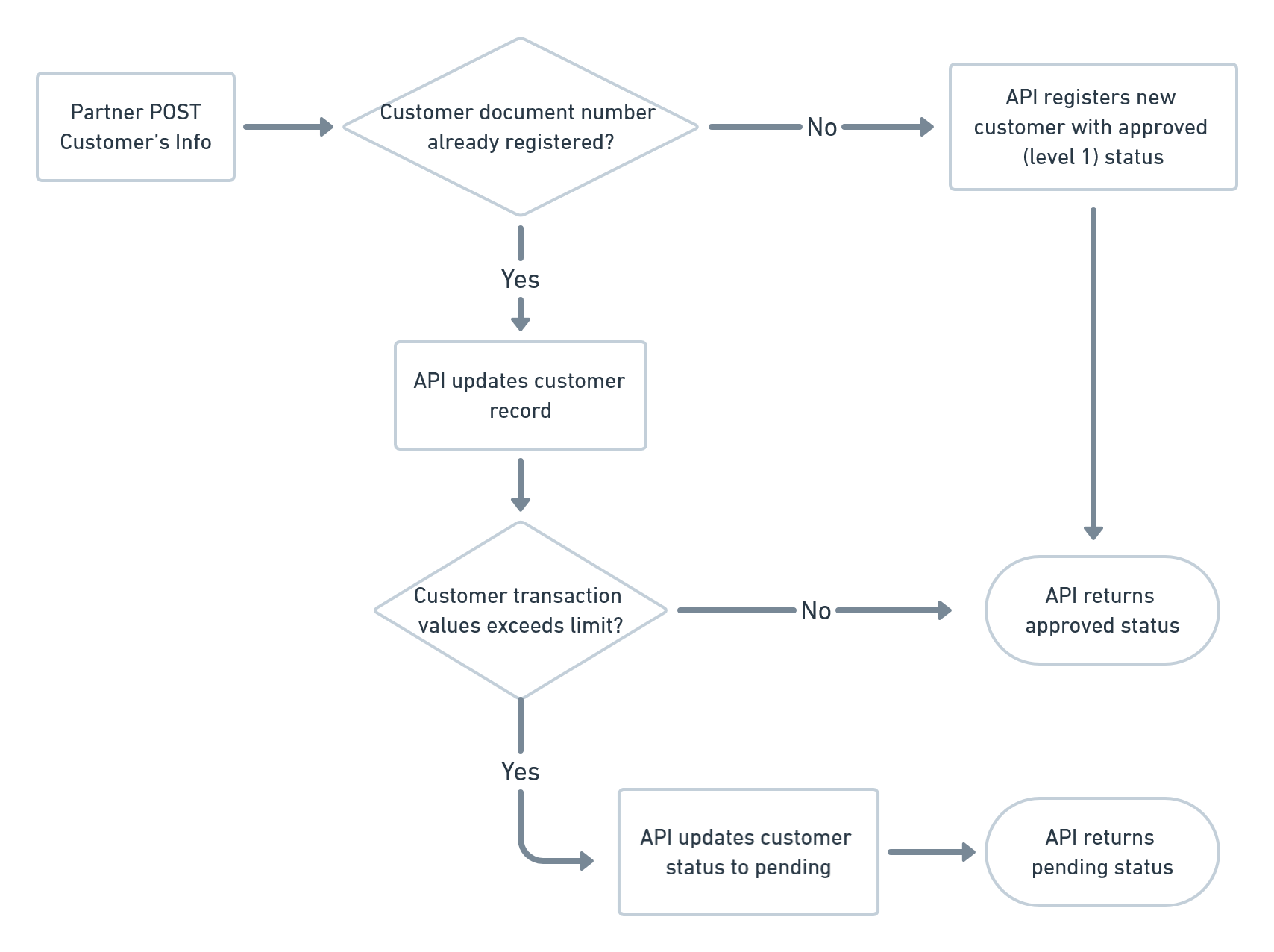
The following endpoint is used to register person customers, regardless of nationality. If a document number has been previously registered, the person's details will be updated. As soon as you send the request to register the customer, you will receive a response with their subject_id.
curl -X POST "https://api.facilitapay.com/api/v1/subject/people" \
  -H "Content-Type: application/json" \
  -H "Authorization: Bearer eyJhbGciOiJIUzUxMiIsInR5cCI6IkpXVCJ9...." \
  -d '{
  "person": {
    "document_number": "70590071050",
    "document_type": "cpf",
    "social_name": "Joaquim dos Santos",
    "email": "[email protected]",
    "phone_country_code": "55",
    "phone_area_code": "18",
    "phone_number": "99812-1212",
    "birth_date": "2015-04-01",
    "net_monthly_average_income": "4000",
    "address_street": "Rua Barão do Rio Branco",
    "address_number": "310",
    "address_complement": "Apt. 44 A",
    "address_postal_code": "16201220",
    "address_city": "Birigui",
    "address_state": "SP",
    "address_country": "Brasil",
    "fiscal_country": "Brasil",
    "documents": [
      {
        "file_type": "application/pdf",
        "file_url": "http://somedomain.com/document-x.pdf",
        "labels": [
          "person-cpf"
        ]
      }
    ]
  }
}'
Common mistakes
Please provide a valid document number without dots or dashes. This field is validated when using all document types accepted by the API (
cpf,curp,cc,ce,rut,passport) as the document type. As some example, you can generate a valid CPF using this website. You can also create a valid CURP/RFC document number using thisother website
HTTP Request
POST /subject/people
Body Parameters
| Parameter | Description | Type | Required | Required For |
|---|---|---|---|---|
person | An object containing all the required values | object | true | |
document_number | Customer's national document number | string | true | All transactions |
document_type | Customer's type of document (cpf, curp, cc, ce, rut, passport) | string | true | All transactions |
social_name | Customer's full social name | string | true | All transactions |
fiscal_country | Customer's fiscal country | string | true | All transactions |
email | Customer's email | string | false | All Cards, PSE and Boleto transactions |
website | Customer's website or related profile page | string | false | |
phone_country_code | Country phones code (2 digits: BR +55; MX +52; CO +57; CL +52) | string | false | All cards transactions in MXN and for PSE |
phone_area_code | Internal country area code | string | false | PSE transactions |
phone_number | Customer's phone number | string | false | All Cards, PSE and Boleto transactions |
birth_date | Customer's birth date | string | false | |
net_monthly_average_income | Customer's monthly average income | string | false | |
address_street | Customer's street name | string | false | All cards, PSE and boleto transactions |
address_number | Customer's house number | string | false | All cards, PSE and boleto transactions |
address_complement | Customer's block or apartment | string | false | |
address_neighborhood | Customer's neighborhood/district | string | false | All cards, PSE and boleto transactions |
address_postal_code | Postal/zip code. | string | false | All cards, PSE and boleto transactions |
address_city | Customer's city name | string | false | All cards, PSE and boleto transactions |
address_state | Customer's state of residence. In Brazil you'll use only 2 letters : AC, AL, AP, AM, BA, CE, DF, ES, GO, MA, MT, MS, MG, PA, PB, PR, PE, PI, RJ, RN, RS, RO, RR, SC, SP, SE, TO. | string | false | All cards, PSE and boleto transactions |
address_country | Customer's country of residence | string | false | All cards, PSE and boleto transactions |
documents | An array of documents related to the Customer (Customers who operate above a threshold value per month or exceed a cumulative limit in the last 12 months of operation must have the following associated documents: rg-number, cpf-number, rg-photo, address-proof, revenue-tax-declaration). | array | false | Customers who exceeds 20k USD annually in their amount of transactions |
documents.labels | Keywords that may help identify the document in the person registration tab. | array | false | When sending documents field |
documents.file_type | Document file MIME type. Must match the document type. | string | false | When sending documents field |
documents.file_data | Document file encoded in Base64. | string | false | When sending documents and using the file_data |
documents.file_name | The name of the file to be stored. Any file extension is accepted, but the extension must be included. Ex: document.pdf, document.docx, report.xls | string | false | When sending documents field and using the file_data |
documents.file_url | Public URL pointing to the document. Note that it must start with http:// or https:// | string | false | When sending documents and using a URL |
Brazilian Person Registration
Request
curl -X POST "https://api.facilitapay.com/api/v1/subject/people" \
  -H "Content-Type: application/json" \
  -H "Authorization: Bearer eyJhbGciOiJIUzUxMiIsInR5cCI6IkpXVCJ9...." \
  -d '{
  "person": {
    "document_number": "70590071050",
    "document_type": "cpf",
    "social_name": "Joaquim dos Santos",
    "fiscal_country": "Brasil"
  }
}'
For Brazil, the document_type is usually the CPF (a 11 digit-number), below you can check a payload sample for registration of a person in Brazil. For other requirements depending on payment methods, check the table Required information for person registration
HTTP Request
POST /subject/people
Body Parameters
Mexican Person Registration
Request
curl -X POST "https://api.facilitapay.com/api/v1/subject/people" \
  -H "Content-Type: application/json" \
  -H "Authorization: Bearer eyJhbGciOiJIUzUxMiIsInR5cCI6IkpXVCJ9...." \
  -d '{
  "person": {
    "document_number": "SOMH031031HSRTRR04",
    "document_type": "curp",
    "social_name": "Horacio Soto Morales",
    "fiscal_country": "Mexico",
    "rfc_pf": "SOMH031031C50"
  }
}'
In Mexico you will need to register a CURP (18 digits) and, if you have one, an RFC (13 digits). This way, once the payment is received and the documents are identified, we can process it. Below you can see a payload with the initial information required. For other requirements, depending on the payment method, see the table Required information for person registration
HTTP Request
POST /subject/people
Body Parameters
Common mistakes
If you are registering a customer with both CURP and RFC_PF, the first 10 digits of these identifiers must match. If they do not, this error will be returned. You can generate a fake CURP and RFC for tests using this link: "https://datafakegenerator.com/genrfc".
Colombian Person Registration
Request
curl -X POST "https://api.facilitapay.com/api/v1/subject/people" \
  -H "Content-Type: application/json" \
  -H "Authorization: Bearer eyJhbGciOiJIUzUxMiIsInR5cCI6IkpXVCJ9...." \
  -d '{
  "person": {
    "document_number": "1037633286",
    "document_type": "cc",
    "social_name": "Pablo Castro",
    "fiscal_country": "Colombia"
  }
}'
In Colombia, the document_type will be put like "cc" (Cedula de Ciudadania - natural citizens, a 10-digit number) or "ce" (Cedula de Extranjeria - for foreign citizens, a 6 to 9-digit number). Below you can check a payload with initial required information. For other requirements depending on payment methods, check the table Required information for person registration
HTTP Request
POST /subject/people
Body Parameters
Chilean Person Registration
Request
curl -X POST "https://api.facilitapay.com/api/v1/subject/people" \
  -H "Content-Type: application/json" \
  -H "Authorization: Bearer eyJhbGciOiJIUzUxMiIsInR5cCI6IkpXVCJ9...." \
  -d '{
  "person": {
    "document_number": "173243421",
    "document_type": "rut",
    "social_name": "Marcela Carolina",
    "fiscal_country": "Chile"
  }
}'
In Chile, the document_type will be "rut" (Rol Unico Tributario, a 9-digit number). Below you can check a payload with initial required information. For other requirements depending on payment methods, check the table Required information for person registration
HTTP Request
POST /subject/people
Body Parameters
Person List
Request
curl -X GET "https://api.facilitapay.com/api/v1/subject/people" \
  -H "Content-Type: application/json" \
  -H "Authorization: Bearer eyJhbGciOiJIUzUxMiIsInR5cCI6IkpXVCJ9...."
You can list the customers already registered, using the following endpoint. Note that the API has a limit of 100 for each request.
HTTP Request
GET /subject/people
Path Parameters
| Parameter | Description | Type | Required |
|---|---|---|---|
| last_id | Last customer UUID for pagination | string | false |
Person Update
Request
curl -X PUT "https://api.facilitapay.com/api/v1/subject/people/5fd0aa81-b427-4a29-9968-6491d1d7f8b0" \
  -H "Content-Type: application/json" \
  -H "Authorization: Bearer eyJhbGciOiJIUzUxMiIsInR5cCI6IkpXVCJ9...." \
  -d '{
  "person": {
    "net_monthly_average_income": "2000"
  }
}'
Common mistakes
It is not possible to update the document_number and document_type.
To update a person's information, you can use the endpoint below:
Note: You can update all fields except for document_number and document_type. There is no need to send fields that are not being updated.
HTTP Request
PUT /subject/people/:id
Path Parameters
| Parameter | Description | Type | Required |
|---|---|---|---|
id | Person's UUID | string | true |
Body Parameters
Person Details
Request
curl -X GET "https://api.facilitapay.com/api/v1/subject/people/ba70edd2-2210-40de-aa14-2e8efa1416f2" \
  -H "Content-Type: application/json" \
  -H "Authorization: Bearer eyJhbGciOiJIUzUxMiIsInR5cCI6IkpXVCJ9...."
To check a person's information, you can use the following endpoint:
HTTP Request
GET /subject/people/:id
Path Parameters
| Parameter | Description | Type | Required |
|---|---|---|---|
id | Person UUID | string | true |
Customer KYC and upload of documents
Webhook
{
  "data": {
    "updated_at": "2023-03-17T18:27:39.671478",
    "status": "reproved",
    "social_name": "Luiz Abreu Neto",
    "required_clearance_level": 2,
    "references": [],
    "phone_number": "119999999999",
    "net_monthly_average_income": "7000.00",
    "id": "a7e3346b-f6fd-4380-bbfc-c6fc51507820",
    "fiscal_country": "Brasil",
    "email": "[email protected]",
    "documents": [],
    "document_type": "cpf",
    "document_number": "61558254676",
    "clearance_level": 1,
    "birth_date": "1990-10-10"
  }
}
All new customers are initially registered and approved as level 1, even when no documentation is provided in the first registration.
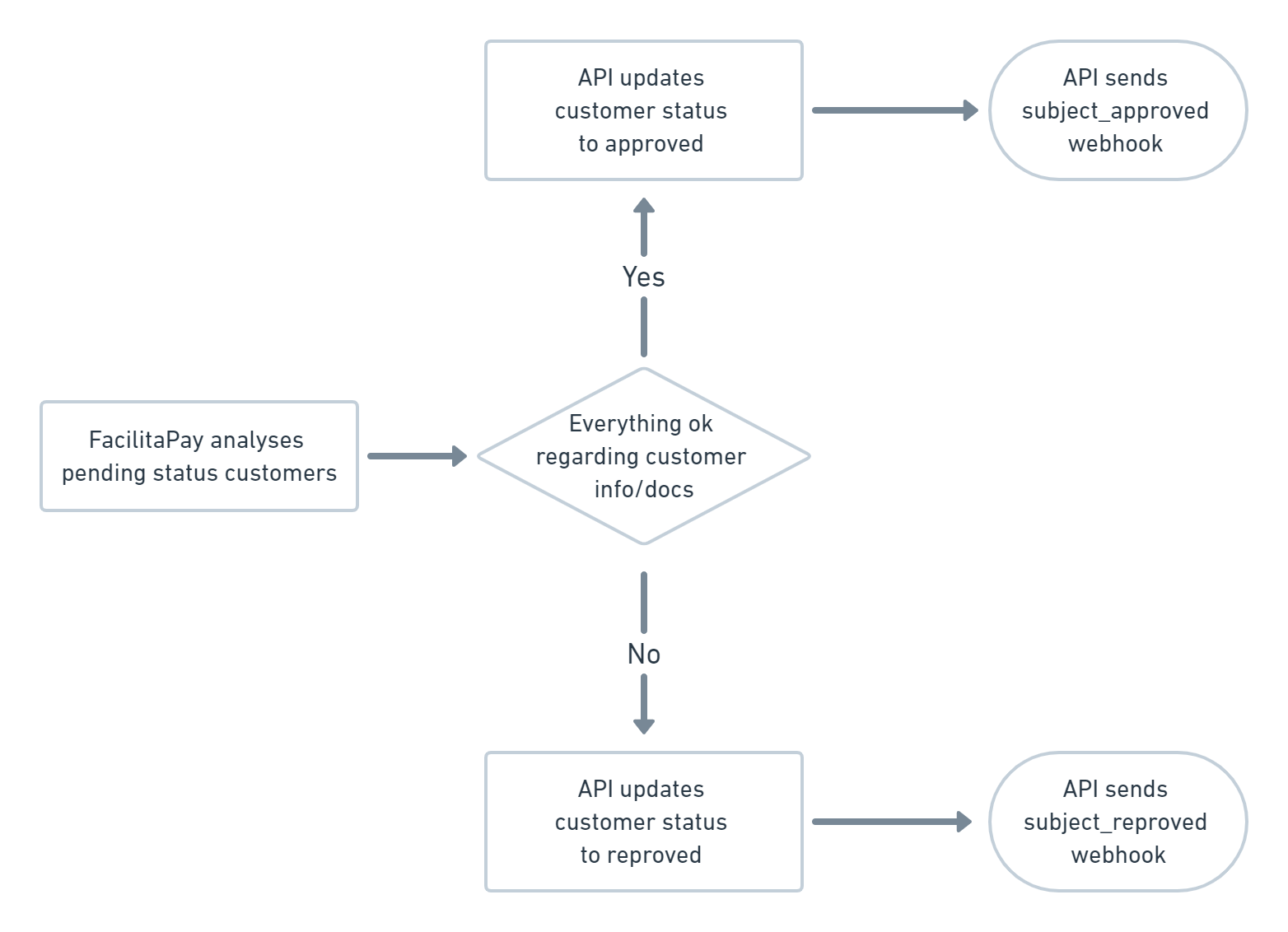
After the customer reaches the limit of 20k USD transacted annually, if any mandatory document is missing, the next payment he'll do will have the flag cleared=false, and a webhook will be sent to you with the documents needed to be uploaded – you can check this section for more information.
Below are the status and how a reproved customer that has not sent his documents for analysis is shown. If money is sent from/to this customer, the transaction will remain on hold (cleared = false) until it is approved again.
| Property | Content |
|---|---|
approved | Customer is able to send/receive money through the platform. No action is needed on your side. |
reproved | Customer is required to send documents for review, or it had already been sent but it had been rejected by KYC, in this case you will need to provide new ones. |
waiting_approval | Customer has sent the KYC documents but is waiting for the analysis from the backoffice. No action is needed on your side. |
Before reaching this stage and receiving the webhook, you can check the amount transacted for that specific subject_id in local currency, as well as the number of transactions. You can use the following endpoint to get this information and ask for the documents in advance.
Get transactions for subject
Get the transactions for that specific subject_id in local currency.
Request
curl -X GET "https://api.facilitapay.com/api/v1/subject/21d90105-5bcb-465c-8c1d-8a2cb8339ecd/transactions" \
  -H "Content-Type: application/json" \
  -H "Authorization: Bearer eyJhbGciOiJIUzUxMiIsInR5cCI6IkpXVCJ9...."
HTTP Request
GET /subject/:id/transactions
Path Parameters
| Parameter | Description | Type | Required |
|---|---|---|---|
id | Customer's UUID | string | true |
Get transacted value for subject
Get the total transactions value for that specific subject_id.
Request
curl -X GET "https://api.facilitapay.com/api/v1/subject/21d90105-5bcb-465c-8c1d-8a2cb8339ecd/transaction_values" \
  -H "Content-Type: application/json" \
  -H "Authorization: Bearer eyJhbGciOiJIUzUxMiIsInR5cCI6IkpXVCJ9...."
HTTP Request
GET /subject/:id/transaction_values
Path Parameters
| Parameter | Description | Type | Required |
|---|---|---|---|
id | Customer's UUID | string | true |
Upload subject documents
Request using a file
curl -X POST "https://api.facilitapay.com/api/v1/subject/5fd0aa81-b427-4a29-9968-6491d1d7f8b0/documents" \
  -H "Content-Type: application/json" \
  -H "Authorization: Bearer eyJhbGciOiJIUzUxMiIsInR5cCI6IkpXVCJ9...." \
  -d '{
  "document": {
    "labels": [
      "rg-number",
      "cpf-number",
      "rg-photo"
    ],
    "file_data": "Base64-encoded-string",
    "file_type": "application/pdf",
    "file_name": "document.pdf"
  }
}'
Request using an URL
curl -X POST "https://api.facilitapay.com/api/v1/subject/5fd0aa81-b427-4a29-9968-6491d1d7f8b0/documents" \
  -H "Content-Type: application/json" \
  -H "Authorization: Bearer eyJhbGciOiJIUzUxMiIsInR5cCI6IkpXVCJ9...." \
  -d '{
  "document": {
    "labels": [
      "rg-number",
      "cpf-number",
      "rg-photo"
    ],
    "file_url": "https://www.rearden.co.us/files/47358347534875.jpeg",
    "file_type": "image/jpeg"
  }
}'
Common mistakes
This error typically occurs when:
- The
file_namefield is missing or does not include the file extension (e.g.,document.pdf,report.docx)- The
file_datais not properly encoded in Base64- The
file_typeMIME type does not match the actual file content
Solution: Ensure the
file_namefield includes the correct file extension and that thefile_datais properly Base64 encoded.
400 - Bad Request
- Make sure all required fields are present in your request.
When sending the documents required, you can use the following endpoint. You can also send, list and show details of the documents related to that specific subject_id. There are two possible ways to send us the documents: by URL or by file (Base64 encoded, no more than 15MB per file).
HTTP Request
POST /subject/:id/documents
Path Parameters
| Parameter | Description | Type | Required |
|---|---|---|---|
id | Customer's UUID | string | true |
Body Parameters
| Parameter | Description | Type | Required | Required For |
|---|---|---|---|---|
document | An array of documents related to the Customer | array | true | |
labels | Labels that will help describe the document. | array | true | Payload using file_data and URL |
file_type | Document file MIME type. Must match the document type. | string | true | Payload using file_data and URL |
file_data | Document file encoded in Base64. | string | false | Payload using file_data |
file_name | The name of the file to be stored. Any file extension is accepted, but the extension must be included. Ex: document.pdf, document.docx, report.xls | string | false | When using sending file_data |
file_url | URL to your image | string | false | Payload using URL |